Imginn: Instagram Viewer Guide, Safety & How It Works
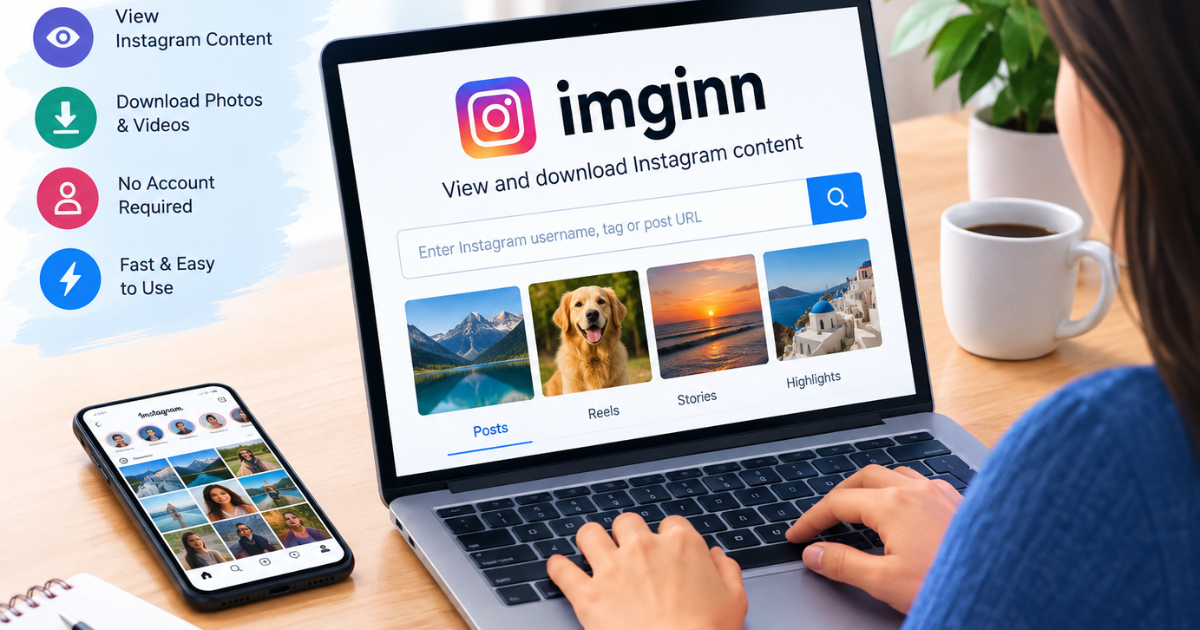
Imginn is a third-party web service associated with viewing publicly available Instagram profiles and media through a separate browser interface. The current Imginn website displays public profile information along with sections for posts, Stories, Reels, and tagged content, and it provides download links for supported media.
The important distinction is that Imginn is not Instagram. It does not turn private Instagram content into public content, and using a third-party viewer does not automatically make your activity invisible to the website you are visiting.
What is Imginn?
Imginn is a browser-based third-party Instagram viewer that can surface publicly available Instagram content without requiring users to use Instagram’s normal interface. The service currently provides public profile pages and media-viewing features, including posts, Stories, Reels, and tagged sections on supported profiles.
For users, the appeal is straightforward: search for a username, find an available public profile, and view the content exposed by the service.
The more important question is what Imginn cannot do. It should not be treated as a method for bypassing an Instagram user’s private-account settings.
What does Imginn do?
The exact features available can change over time, but the current Imginn site presents several main functions:
| Function | What it means |
| Profile search | Find an Instagram profile using a username |
| Post viewing | Browse publicly available posts |
| Story viewing | View Stories that the service can currently retrieve |
| Reels viewing | View supported public Reels |
| Tagged content | Browse available tagged media |
| Media downloads | Download supported photos or videos |
| Browser access | Use the service through a web browser |
The site’s current public profile pages visibly contain tabs for POSTS, STORIES, REELS, and TAGGED, together with download links for displayed media.
That does not mean every account or every item will always be available. Third-party services depend on what they can retrieve and display at a given time.
How does Imginn work?
At a user level, the process is simple.
You enter an Instagram username into the viewer, select the matching profile, and then browse whatever public content the service is able to display.
You do not need to think of Imginn as a second Instagram account. It is better understood as a separate viewing interface for publicly accessible Instagram material.
That distinction also explains why results can differ from what you see inside Instagram itself.
A third-party service may have:
- Delayed content
- Missing Stories
- Missing Reels
- Incomplete profile information
- Different media availability
- Temporary search failures
So a missing result does not automatically mean the Instagram account does not exist.
How to use Imginn
Step 1: Open the intended Imginn website
Search carefully before entering anything.
There are currently multiple similarly named websites using variations of the Imginn name, including imginn.com, imginn.app, imginn.io, and imginn.net.
Do not assume that every domain using the name “Imginn” is operated by the same organization.
Step 2: Search for an Instagram username
Enter the public Instagram username you want to find.
Avoid copying unnecessary information into third-party sites. A username is normally sufficient for a profile search.
Step 3: Check the profile carefully
Look at the username and other visible profile information to make sure you have found the correct account.
Popular usernames can be similar, and third-party pages may not provide all of Instagram’s normal context.
Step 4: Browse available content
Depending on availability, a profile may show sections for posts, Stories, Reels, and tagged content. The current Imginn profile interface demonstrates these categories.
Step 5: Download supported media
Where a download control is provided, it may allow a displayed photo or video to be saved locally.
Remember that being able to download a file does not automatically give you permission to republish it, commercially exploit it, or claim it as your own.
For someone else’s content, check the creator’s permissions and any applicable copyright or platform rules before reuse.
Can Imginn view private Instagram accounts?
You should not expect Imginn to provide legitimate access to private Instagram content.
Instagram distinguishes between public and private accounts. Meta explains that when an Instagram account is private, people generally need to be approved followers to see its posts, Stories, and Reels.
That means an anonymous viewer cannot simply erase the privacy decision made by the account owner.
Some third-party sites may make claims about private-account viewing. Those claims should be treated cautiously, especially if the site asks for an Instagram password, verification code, or other sensitive account information.
What a private account changes
A private profile can still expose some basic profile information to visitors, but its restricted posts and other private content are protected by Instagram’s access controls.
So these are different things:
Public profile information: potentially visible
Private posts and Stories: restricted to authorized followers
Third-party password request: a major reason to stop and reassess the site
Is Imginn really anonymous?
The word anonymous needs some clarification.
From the Instagram-account-owner perspective, a third-party viewer may not associate your viewing activity with your personal Instagram account in the same way as viewing content through your logged-in Instagram account.
But that is not the same thing as saying:
“Nobody can identify or track anything about you.”
A third-party website can potentially receive ordinary web-traffic information such as browser, device, network, and cookie-related data. What a particular service collects, stores,s or shares depends on that site’s technology and policies.
Recent third-party testing and reviews have also reported inconsistent experiences involving cookies, advertisements, redirects, ts and missing privacy documentation. Those are claims about particular tests, not universal proof about every Imginn session.
A better way to think about anonymity
Think of it as two different questions:
| Question | What you should consider |
| Will the Instagram account necessarily see my personal Instagram username as the viewer? | A third-party viewer may avoid linking the view to your Instagram account |
| Does that mean the third-party website knows nothing about my visit? | No. Do not assume that |
This distinction is one of the most important things many simple Imginn guides leave out.
Is Imginn safe to use?
There is no responsible reason to treat an unfamiliar third-party viewer as automatically risk-free.
The safest approach is to reduce what you give the service.
Never enter your Instagram password.
You do not need to provide your Instagram password merely to search for a public username.
A third-party viewer requesting Instagram credentials should be treated as a significant warning sign.
Avoid unnecessary downloads
Download only the content you actually need, and scan unfamiliar files before opening them.
A website offering a media download should not require you to install unrelated browser extensions or unknown programs.
Be careful with redirects.s
Some current reviews of Imginn and similar services describe advertising, redirects, ads, and other interruptions. These reports vary by date and session, so treat them as practical warnings rather than permanent characteristics.
Check the domain
The name “Imginn” is currently associated in search results with several similarly branded domains.
That makes domain verification particularly important.
Imginn vs Instagram
Imginn and Instagram serve very different purposes.
| Feature | Imginn | |
| Official Instagram product | No | Yes |
| Full account management | No | Yes |
| Posting content | No | Yes |
| Messaging | No | Yes |
| Following accounts | No | Yes |
| Public-profile browsing through a separate interface | Yes, where supported | Yes |
| Private-account access without approval | No legitimate bypass | Controlled by Instagram |
| Media downloads | Supported for some displayed content | Depends on Instagram feature/context |
| Third-party privacy considerations | Yes | Governed by Instagram/Meta’s systems and policies |
The point is not that one replaces the other.
Instagram is the social platform. Imginn is a third-party viewing service.
Why is Imginn not working?
If Imginn does not return a profile or media, several explanations are possible.
1. The Instagram account is private
This is one of the simplest explanations.
Instagram’s privacy controls prevent unauthorized viewers from seeing restricted content.
2. The username is incorrect
Check spelling carefully.
A username can be particularly easy to mistype when it contains:
- Periods
- Underscores
- Numbers
- Repeated letters
- Recent username changes
3. The profile has changed
An Instagram account may have changed usernames, been deactivated, been restricted, or otherwise become unavailable.
4. The specific content is unavailable
A profile might appear while certain Stories, Reels, or posts do not.
This can happen because a third-party service does not necessarily reproduce every element of Instagram.
5. Imginn itself is having a technical problem
Third-party viewers depend on their own servers and whatever access they can maintain to external platform data.
Reports in 2026 describe intermittent reliability issues across the broader category of anonymous Instagram viewers, including Imginn.
6. The page you found is not the service you expected
Because multiple Imginn-like domains appear in search results, check the domain before assuming a cloned or similarly branded site is the same service.
What should you do when Imginn cannot find a profile?
Use this quick checklist:
Check the username → confirm the account is public → try the profile’s direct Instagram URL → refresh later → verify the domain → do not enter your Instagram credentials.
If the profile is private, the practical solution is not another “private viewer.” The legitimate route is to use Instagram’s own access system and obtain permission from the account owner.
Can you download Instagram photos and videos with Imginn?
The current Imginn website provides download controls on supported public-profile media pages.
However, there are two separate issues:
Technical access
Can the service retrieve the media and provide a download?
Permission to reuse
Are you actually allowed to copy, edit, publish, or commercially use the content?
Those are not the same question.
For example, downloading a public photo for personal reference is different from downloading it and uploading it to a business website without permission.
When in doubt, ask the creator for permission or use content for which you have appropriate rights.
What Imginn is useful for
A third-party viewer can be useful for limited situations such as:
- Quickly checking a public profile
- Browsing publicly available posts
- Looking at public media through a browser
- Saving content when the relevant download is legitimately available
- Checking public information without managing another Instagram account
It is less suitable for:
- Managing your Instagram account
- Posting content
- Private conversations
- Private profiles
- Guaranteed access to every Story or Reel
- Large-scale data collection
- Monitoring someone’s private activity
Common mistakes when using Imginn
Mistake 1: Assuming “anonymous” means completely untraceable
It does not.
The safer interpretation is that your personal Instagram account may not be directly associated with the viewing activity.
Mistake 2: Giving a third-party site your Instagram password
There is rarely a good reason to do this for a basic public-profile viewer.
Mistake 3: Believing every Imginn-branded website is identical
Current search results show multiple domains using the Imginn name.
Mistake 4: Trying to bypass private-account controls
Private means restricted.
Do not treat a third-party viewer as a legitimate method for defeating those permissions.
Mistake 5: Assuming downloaded content is free to republish
Downloading and copyright permission are separate issues.
Mistake 6: Assuming an unavailable profile proves the account is gone
A temporary technical issue or third-party retrieval problem can produce the same result.
A simple Imginn safety checklist
Before using any third-party Instagram viewer:
- Confirm the domain.
- Do not enter your Instagram password.
- Do not give away verification codes.
- Avoid suspicious browser extensions.
- Be cautious with pop-ups and redirects.
- Download only files you understand.
- Respect private-account settings.
- Do not assume downloading equals permission to republish.
- Remember that third-party anonymity claims are not the same as guaranteed privacy.
Meta’s own privacy guidance emphasizes that people control who can see content through account and audience settings, while Meta has also taken enforcement action against unauthorized automated collection of Instagram data.
What should you know about Instagram’s terms?
Instagram’s platform rules matter because third-party access and automated collection can involve separate technical and contractual questions.
Meta has publicly described enforcement against unauthorized automated scraping of Instagram profiles and content. In one case, Meta said automated software was used to collect profiles, posts, photos, Stories and profile information without authorization.
That does not mean every visit to every third-party viewer is automatically unlawful. The point is simpler: users should not assume that because content appears publicly accessible, every method of collecting, storing, or redistributing it is automatically permitted.
For business, research, archiving, or large-scale use, review the applicable platform terms and legal requirements before proceeding.
Is Imginn the same as Instagram?
No.
Instagram is the official Meta-owned social platform.
Imginn is a separate third-party website associated with displaying Instagram-related public content through its own interface. The current Imginn site itself does not present it as Instagram’s official service.
This distinction matters for privacy, security, reliability, and account access.
FAQs
What is Imginn?
Imginn is a third-party web service associated with viewing publicly available Instagram profiles and media through a separate browser interface. Its current site displays public-profile sections such as Posts, Stories, Reels, and Tagged content.
Does Imginn require an Instagram account?
The current Imginn site promotes browser-based public-profile viewing without requiring users to interact with Instagram through its normal logged-in interface.
Can Imginn view private Instagram accounts?
No legitimate third-party viewer should be expected to bypass Instagram’s private-account restrictions. Instagram states that private-account content is limited to approved followers.
Is Imginn anonymous?
Imginn is marketed as an anonymous viewing service, but “anonymous” should not be interpreted as complete invisibility to the third-party website itself. Your Instagram account may not be directly associated with the view, but website-level tracking and technical data are a separate issue.
Can Imginn download Instagram photos and videos?
The current Imginn site provides download controls for supported public media. Whether you may legally or contractually reuse downloaded content is a separate question from whether it can technically be downloaded.
Why is Imginn not showing an Instagram profile?
Possible reasons include a private account, an incorrect username, a changed or unavailable account, unavailable content, or a temporary problem with the third-party service.
Is Imginn the official Instagram website?
No. Imginn is a third-party service and is separate from Instagram and Meta.
What should I do if an Imginn site asks for my Instagram password?
Do not provide the password merely to browse public content. Close the page and use a service that does not require unnecessary account credentials.
Final takeaway
Imginn is best understood as a third-party Instagram viewing tool for publicly available content, rather than a replacement for Instagram.
It can be useful when you want to look up public profiles and supported media through a browser. The current service provides profile pages with posts, Stories, Reels, and tagged sections, along with download controls for supported media.
But the practical limitations matter just as much as the features.
Private Instagram content remains restricted by Instagram’s privacy system. Third-party “anonymous” viewing should not be confused with total online anonymity, and users should never hand over Instagram credentials simply to browse a public profile.
The safest approach is straightforward: use public information only, verify the domain, protect your credentials, and treat downloads and reused content responsibly.
You May Also Like: Instagram Login